If you’ve ever driven along a highway and glanced at a river crossing dotted with thick, durable cables strung high above the water, chances are good you were looking at Fig.8 self-support optical fiber cables. As a supplier that’s been engineering and shipping these reliable cables to telecom, utility, and infrastructure teams across North America for over a decade, I’ve seen firsthand how many project teams underestimate the unique challenges of installing these fibers over water—from navigating river currents and wind loads to making sure the cable stays aligned for decades, not just the initial installation. Today, I’m pulling back the curtain on exactly how we guide our clients through a successful river crossing installation, drawing on the lessons we’ve learned from hundreds of projects big and small. Fig.8 Self-support Optical Fiber Cable
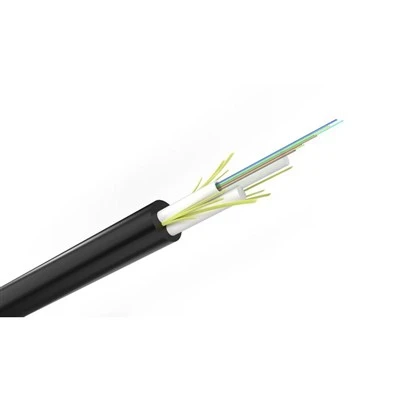
First, let’s get clear on why Fig.8 cables are the go-to for river crossings, because that foundation is what makes the installation process make sense. Unlike loose-tube cables that need separate messenger wires to support their weight, a Fig.8 cable has a built-in, rigid steel or aluminum messenger at its core—shaped like the number 8, hence the name. That built-in support cuts down on material costs, reduces the number of parts you have to handle, and makes it much easier to string the cable without risking damage to the delicate optical fibers inside. For river crossings specifically, that built-in messenger also means you don’t have to anchor two separate structures to either bank, which is a huge win for river ecosystems and avoids the need for extra drilling or heavy equipment near the water’s edge. But that same sturdy design means the installation process needs to account for extra weight loads—more than you’d see on roadside pole runs or underground installations. That’s why pre-planning is non-negotiable.
Before you ever show up at the river site, you have to do three core things: survey the site, calculate load requirements, and match the right Fig.8 cable to your project. Let’s start with the site survey. Last year, we had a client come to us with a river crossing that looked simple on paper—just a 120-meter stretch over a calm, narrow creek in rural Ohio. But when our in-house field team did a walkthrough a week later, they noticed something critical: the river had a hidden fast channel just below the surface, and local fishermen told us that strong, straight-line winds sweep through that valley for three months every spring, which pushes small motorboats through the area at high speeds. Had the client skipped the on-site survey, they would have ordered a cable rated for low wind loads and a shorter span, and we would have had to rush to replace it mid-installation—something that would have cost them tens of thousands in delays. For every site, we send a team to map not just the distance between the two banks, but the average and peak wind speeds over the course of a year, river current strength, flood levels, boat traffic (to avoid interference during installation and long-term use), and the condition of the existing anchors or poles on both banks. We also check for any environmental protections: many rivers have protected wetlands or endangered species nesting areas within 50 meters of the banks, so we have to make sure our installation route doesn’t disturb that. That survey data feeds directly into our load calculations, which tell us what gauge of messenger wire we need, what strength of cable will resist wind and ice loads, and what kind of anchor points to use.
Next, matching the correct Fig.8 cable is critical. We stock a range of options, from 12-fiber cables for small rural networks to 144-fiber cables for large metro crossings. But beyond fiber count, we tailor the cable to the river’s conditions. For example, a river in Alaska that gets frequent ice floes needs a cable with a thicker outer jacket and a steel core messenger, while a calm, warm river in Florida can use an aluminum core messenger, which is lighter and more cost-effective. We also advise on whether to add a rip cord or a armored sheath for extra protection against boat propellers or debris, which is a common request for rivers with high recreational traffic. Last year, a client in Louisiana told us they had lost three separate fiber runs to prop strikes on a popular bayou, so we worked with our engineering team to add a 2mm steel armor layer to their Fig.8 cable, which took just a week to custom-manufacture and added almost no extra installation time.
Once you have the right cable and site data, it’s time to move to the preparation phase, which includes setting up temporary and permanent anchor points. Permanent anchors are the backbone of the installation, and they have to be strong enough to hold the full weight of the cable plus extra tension from wind, ice, or boat impact. For most river crossings, we recommend using helical anchors—big, screw-in anchors that twist deep into the bank, rather than concrete footings, because they’re faster to install and don’t require heavy equipment to pour concrete, which reduces disturbance to the river. We usually size the anchors based on the load calculations we did during the survey: a 100-meter crossing with high wind loads needs two 2-ton helical anchors on each bank, while a smaller 50-meter crossing can get away with 1-ton anchors. Before drilling, we always confirm with local utility or environmental agencies that we’re not drilling near gas lines, water pipes, or protected tree roots—another mistake we’ve seen first-hand: a client in Kentucky hit a 6-inch water main during anchor installation, which shut down a small town’s water for 12 hours and added $20,000 in fines. We also install temporary anchor points on both banks to pull the cable across before anchoring it permanently, and we set up a temporary “pulling line” first. That pulling line is usually a lightweight rope or synthetic line that’s strong enough to pull the cable across the river, and it’s a critical safety step: never try to pull the heavy Fig.8 cable directly, because it can snag on tree branches, rocks, or debris in the water, and putting all that tension directly on the cable can damage the internal fibers.
Now, the part everyone worries about: stringing the cable across the river. There are two main methods we recommend, and we pick one based on the river’s width, current, and access to both banks. The first method, used for narrow rivers (under 150 meters) with good access on both sides, is the “hand pull” method. This is the most cost-effective for small projects. We send two field teams, one on each bank, with the pulling line strung between their temporary anchors. One team ties the pulling line to the end of the Fig.8 cable, making sure the tie is tight but not so tight that it cuts into the cable’s outer jacket. Then, both teams work in sync: the team on the opposite bank slowly pulls the line, while the team feeding the cable from their bank makes sure it doesn’t snag on the ground, tree, or anything else along the way. For a small 80-meter crossing, this process takes about 45 minutes, and we always have two backup people on each bank to adjust if the cable starts to twist or catch. For wider rivers, or rivers with fast currents that make a hand pull risky, we use the “boat launch” method. For this, we hire a small, stable workboat (usually a flat-bottomed boat with a low draft, so it doesn’t hit the riverbed) that carries the end of the pulling line and the Fig.8 cable out to the middle of the river. One team stays on each bank to hold the line steady, and the boat crew moves slowly across the river, laying the cable out behind them in a straight line. This method is faster for wide crossings—we once did a 300-meter crossing in two hours with this method—but it requires extra safety: we only use the boat on days with calm winds, and we have a spotter on each bank to watch for overhead power lines or tree branches that the boat might hit. Last year, we had a client in Montana try to use a jet ski instead of a flat-bottomed boat, and the jet ski’s wake pushed the cable into a group of willow trees, which snagged and tore a 10-meter section of the cable. That delay cost them three days, so we now emphasize that flat-bottomed boats are non-negotiable for this step.
Once the cable is strung across the river, the next critical step is tensioning and sag adjustment. This is where most installers go wrong, and it’s the reason many Fig.8 river crossings start to sag or pull too tight within a year. Sag is the amount of slack in the cable between the two anchors, and it’s determined by the span length, cable weight, and wind load. Too much sag, and the cable can swing into contact with power lines, tree branches, or even the water during high flood levels. Too little tension, and the cable will stretch too tight, which can cause the messenger wire to break in cold weather or during high winds, and it also puts extra stress on the internal optical fibers, which can lead to signal loss over time. We have a standard sag chart we share with all our clients, based on cable type and span, but we also recommend using a tension meter to get an exact reading as you adjust. For example, a 150-meter span with an aluminum core messenger needs a tension of 800 lbs and a sag of about 1.2 meters in calm weather. For spans over 200 meters, we always use a laser level to double-check the sag, because manual measurements can be off by several inches over long distances. During this step, we also make sure the cable is not twisted—twists can kink the messenger wire and damage the fibers, so we use a cable roller at each anchor point to feed the cable through as we tension it, which keeps it straight and aligned.
After tensioning and sag are set, it’s time to anchor the cable permanently and do the final testing. First, we secure the cable to the permanent anchors using heavy-duty stainless steel clamps, which are resistant to rust and corrosion—critical for areas near water. We leave a small amount of slack at each anchor point to allow for temperature changes, because metals expand and contract with heat and cold, which would pull the cable too tight in winter or too loose in summer if there’s no give. Then, we do two types of testing: a visual inspection to make sure the cable is straight, the clamps are tight, and there’s no damage to the outer jacket, and an optical power test to make sure the fibers are transmitting signal correctly. We use an optical time-domain reflectometer (OTDR) to scan the entire cable length, checking for any breaks, kinks, or signal loss that might have happened during installation. Last year, we caught a small kink in a 12-fiber cable during the test, just as we were finishing up, and we were able to re-tension the cable to fix it, avoiding a service call that would have cost the client $5,000.
Even with all these steps, there are common pitfalls that can derail a river crossing installation, and I’ve seen most of them. One big one is not accounting for seasonal changes: a river that’s 1 meter deep in July can flood to 5 meters in April, so you have to make sure the cable is strung high enough above the water level to avoid contact during floods. We always recommend a minimum of 2 meters of clearance above the 100-year flood level, which is a standard for telecom infrastructure. Another common mistake is not securing the cable properly against boat traffic. For rivers with heavy boat traffic, we recommend adding a warning marker every 20 meters along the cable, so boaters can see it and avoid hitting it. We also offer a small, lightweight protective cover that can be placed over the cable at high-traffic points, which adds an extra layer of defense against prop strikes.
As a Fig.8 self-support optical fiber cable supplier, our job isn’t just to send you the right cable—it’s to make sure your installation goes smoothly, even over tricky river crossings. We provide free pre-installation surveys, custom cable specs, and on-site support for large projects, and we’ve built our business on repeat clients who know we stand behind our products and our process.
If you’re planning a river crossing project, whether it’s a small 50-meter run for a rural broadband network or a 300-meter crossing for a metro expansion team, we can help you every step of the way. We’ve worked in every type of river condition, from the icy rivers of Alaska to the warm, busy bayous of Louisiana, and we know what it takes to get the job done right, on time, and without costly delays.
For more information and to start a conversation about your Fig.8 cable river crossing project, get in touch with our team today. We’re here to answer questions, share project case studies, and help you build a reliable fiber network that will last for decades.
Duct Optical Fiber Cable References
- Telecommunications Industry Association. TIA-598-C: Optical Fiber Cable Color Coding. 2021.
- International Electrotechnical Commission. IEC 60794-1-1: Optical Fibre Cables – Part 1-1: Generic Specification. 2018.
- National Electrical Safety Code. NESC 2023: Rules for the Protection of Electric Supply and Communication Facilities. 2023.
- Fiber Optic Association. Field Installation and Maintenance of Optical Fibers. 2022.
- American Water Works Association. Best Management Practices for Installation of Utility Facilities Near Rivers and Streams. 2020.
Hangzhou Lin’an Kexin Optical Cable Co., Ltd.
As one of the most professional fig.8 self-support optical fiber cable manufacturers and suppliers in China, we’re featured by quality products and good price. Please rest assured to wholesale discount fig.8 self-support optical fiber cable made in China here and get pricelist from our factory. Customized orders are welcome.
Address: No. 28 Linglong Street,Lin’an Area, Hangzhou City, Zhejiang Province, China
E-mail: sales@kexincable.com
WebSite: https://www.kexincable.com/
